Skip to content
Knowledge article

HubSpot Contract Management: Never Miss a Notice Period or Renewal Again

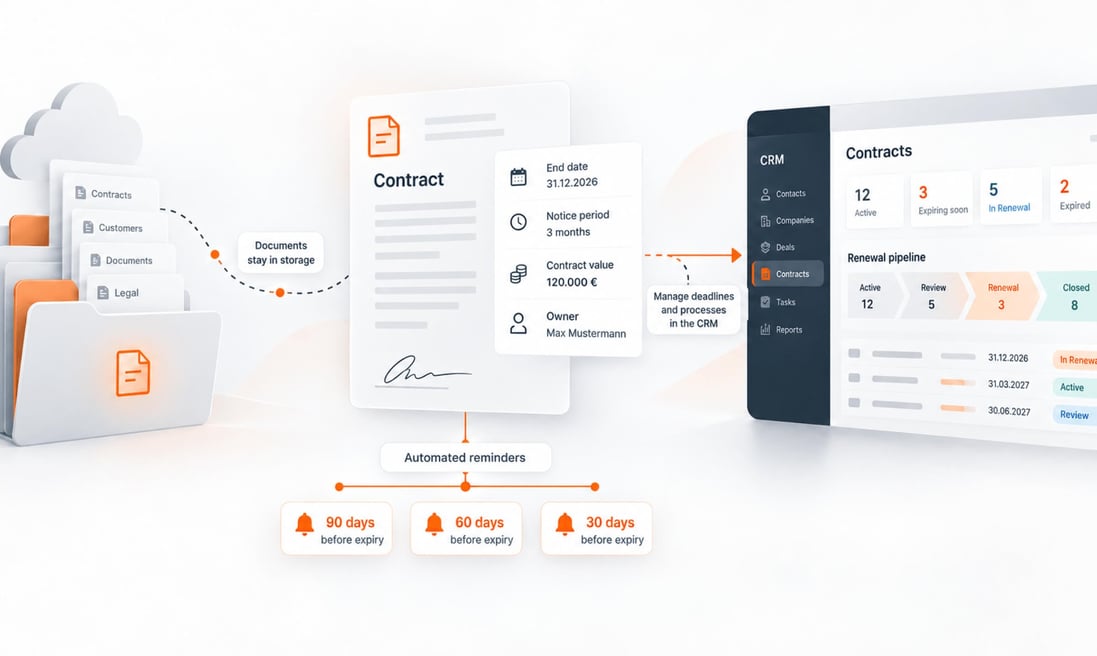
Contract management in HubSpot works like this: The contract documents remain in the existing storage system—such as SharePoint—while the contract data (expiration date, notice period, contract value, and person in charge) is recorded in a structured manner in the CRM. Date-based workflows automatically remind the person in charge 90, 60, and 30 days before the contract expires or the notice period begins. This works equally well for customer contracts and supplier contracts, and the data model—including the workflows—can be set up in just a few days.


HubSpot Contract Management: Never Miss a Notice Period or Renewal Again
26:01

b4you-hubspot-vertragsmanagement-1200x700 (2)

At a Glance

  • What it is: Structured contract data with automatic deadline reminders in HubSpot CRM. The documents remain in SharePoint, Google Drive, or AWS.

  • Prerequisites: Date-based workflows starting with Sales Hub or Service Hub Professional; a “Contract” custom object starting with the Enterprise license.

  • Key features: 90/60/30-day reminder chain, renewal pipeline, escalation to executive management, AI-powered extraction of key data from contract PDFs via n8n.

  • Effort required: Data model and workflows can be set up in a few days. The greatest effort lies in compiling the contract inventory and entering existing contracts.

Every company has them: contracts with customers, contracts with suppliers, maintenance contracts, service level agreements, and framework agreements. And almost every company is familiar with this scenario: A customer contract quietly expires; no one initiated a discussion about renewal in time, and suddenly the customer is negotiating with a competitor. Or vice versa. A supplier contract automatically renews for another year because the notice period was missed, even though the terms have long since ceased to reflect market conditions.

Both cost money, and both stem from the same root cause. Contracts exist as documents in folders, but the deadlines contained within them aren’t tracked by any system that actively reminds you of them.

In this article, we’ll show you how to set up contract management in HubSpot. The contract documents can stay where they are today. The contract data (expiration date, notice period, contract value, person in charge) belongs in the CRM, backed by workflows that automatically remind your team in a timely manner. This applies to both customer contracts and supplier contracts.

Why should contract management be part of CRM rather than just stored in a file?

This is what traditional contract management looks like in small and medium-sized businesses. The signed PDF is stored in SharePoint, on a file server, or in the email inbox of the person in charge. The notice periods are listed in an Excel spreadsheet that someone maintains—or perhaps doesn’t maintain.

That’s exactly where the problem lies, because a file repository is passive. It doesn’t alert you. Only someone who actively checks knows whether a contract expires in 90 days. And in day-to-day operations, no one actively checks.

A CRM like HubSpot flips this logic on its head. The contract document stays where it is. But the data from the contract becomes an active trigger.

Does the contract end in 90 days?

The assigned sales representative is automatically tasked with scheduling a renewal meeting with the customer.

Does the supplier's notice period expire in 60 days?

The purchasing department is reminded to review the terms and conditions before the contract is automatically renewed.

Has the contract been extended?

The new end date is entered, and the cycle starts over.

The filing system answers the question, “Where is the contract?” The CRM answers the question, “What do I need to do, and when?” For management, the second one is what matters.

From our project experience, we know that the greatest leverage lies in customer contracts. A renewal that is actively addressed three months before the contract expires is a consultative discussion on equal footing. The customer feels that someone is taking care of them in a timely manner. If the same renewal is negotiated under time pressure just two weeks before expiration, the discussion revolves solely around price and terms.

How do automatic reminders for contract renewals work in HubSpot?

At the heart of this is a date-based workflow. HubSpot can trigger actions based on a date field—for example, “90 days before the contract expires.” This allows you to set up a chain of reminders that looks like this in practice.

90 days before the contract expires, the person responsible for the contract (Sales at the customer’s end, Purchasing at the supplier’s end) is tasked with reviewing the contract and scheduling a meeting with the customer or supplier, as applicable. In addition, HubSpot can automatically create a new deal in a dedicated renewal pipeline. This way, the renewal is managed like a sales opportunity, complete with stages, ownership, and a forecast.

A second reminder is sent 60 days before the contract expires if the renewal has not yet been processed. Optionally, the issue can be escalated to team leadership if the status remains unchanged.

The final escalation level takes effect 30 days before a contract expires. Now, management can also see which contracts are at risk in the dashboard.

The record is associated with the person designated as the owner of the contract, not with an anonymous collective address. Responsibility is embedded in the system and does not depend on the memory of individual employees. This protects you even if someone leaves the company or is absent for an extended period.

→ For management, this results in a reporting system that did not previously exist in this form. Which contracts are set to expire in the next six months? How much recurring revenue is up for renewal? How many renewals have we secured in the last twelve months, and how many have we lost?

Does this also apply to supplier contracts?

Yes, and this is often underestimated. While HubSpot is designed as a customer CRM, suppliers are—technically speaking—simply companies with a different role. In practice, this is how we handle it.

icon-slash
Suppliers are listed as companies in the CRM and clearly identified using a property field (for example, “Relationship Type,” with the values Customer, Supplier, or Partner).
icon-slash
Supplier contracts have the same data structure as customer contracts, namely start date, end date, notice period, automatic renewal (yes/no), contract value, and contact person.
icon-slash
The workflows differ only in their objectives. For the customer, the task is “sell a renewal”; for the supplier, it is “review and renegotiate terms or terminate the contract by the deadline.”

Especially for supplier contracts with automatic renewal, the notice period is the decisive date, not the contract end date. That’s why we recommend setting the reminder workflow to the latest possible termination date, with enough lead time for meaningful negotiations.

For customers, the workflow ensures that you nurture the relationship in a timely manner and don’t lose revenue. For suppliers, it ensures that you aren’t bound any longer than necessary to terms that no longer suit your business.

How do contract documents in SharePoint and contract data in HubSpot fit together?

Many Swiss companies have long since set up their document management systems, whether in Microsoft SharePoint, Google Drive, or a cloud storage service like AWS. These systems define access controls, versioning, and regulated retention policies. That’s a good thing, and a CRM project doesn’t need to change that. In this article, we’re using SharePoint as an example because it’s the most widely used system among Swiss small and medium-sized businesses. The principle works exactly the same way with other storage systems. The only question is how to bring these two worlds together.

The process is simpler than many people think. It starts in the document repository—that is, where contracts are already stored today. The signed contract is stored in SharePoint as usual. The document remains there. A link appears in HubSpot, directly next to the corresponding record. Anyone working in the CRM can access the original document with a single click, without it ever being duplicated.

This requires an interface that automatically sets this link. Neither HubSpot nor Microsoft provides such an integration out of the box. Nevertheless, this won’t turn into a major development project. The HubSpot App Marketplace offers ready-made, specialized integration apps (such as CloudFiles) that link SharePoint, Google Drive, or AWS directly to HubSpot records.

In our projects, we typically handle this connection using n8n, an automation platform that connects HubSpot and SharePoint via their standard interfaces. When a contract is saved in the corresponding SharePoint folder, n8n detects the new document and automatically adds the link to the correct record in HubSpot. This can be set up in just a few days, operated transparently, and expanded with additional automations as needed. In the past, such an integration project required specifications, development, and lengthy testing phases. Today, a Marketplace app or an n8n workflow is all it takes.

And how do the contract details get into the CRM?

The link leads to the document. However, the workflows from the previous chapters require structured data—such as the contract expiration date, notice period, contract value, and the person responsible. This data is contained in the PDF, but a PDF cannot trigger a workflow. There are three ways to achieve this, which can also be combined in practice.


  • Route 1
    Manual data entry at the time the contract is signed.

    The person in charge enters the key data directly into the CRM the moment the contract is signed. This takes just a few minutes per contract and is the practical standard that any contract management system can start with. A mandatory-field approach ensures that critical data—especially the end date and the notice period—is never missing.

  • Route 2
    The acquisition resulting from the deal.

    For customer contracts that result from a sales process in HubSpot, much of the data is already available, since the contract value, term, and points of contact are already included in the deal and the quote. A workflow automatically transfers this data to the contract record when the deal is closed (“Closed Won”). The only information that needs to be added manually is what wasn’t captured during the sales process.

  • Route 3
    Automatic extraction using AI.

    This approach is why we at business4you typically implement these integrations using n8n. n8n can do more than just create a link; it can directly extract the key details of the contract stored in SharePoint. Here’s exactly how it works: As soon as the signed contract is stored in SharePoint, n8n reads the PDF. An AI step identifies the key details in the contract text—such as term, notice period, renewal clause, and contract value—and uses them to create the contract record in HubSpot as a draft. A person reviews and confirms the data before the workflows take effect. This way, the CRM record is automatically generated from the document, eliminating the need for manual double entry. This significantly reduces the effort required for data entry—especially for supplier contracts that do not originate from a HubSpot deal—and minimizes typos in critical data.


The document is thus transferred from SharePoint to the CRM as a link. Depending on the contract type, the data is transferred to the CRM from the deal, via manual entry, or through AI extraction. Together, these two methods result in the following pattern:

SharePoint (or Google Drive, AWS) remains the single source of truth for documents. The signed contract PDF, attachments, and addenda are stored in the document repository, with the access permissions defined there. In HubSpot, only the link to these documents exists.

HubSpot will become the single source of truth for contract data and processes. Contract terms, deadlines, values, statuses, and the associated workflows are all managed within the CRM.

The interface automatically links the two. The link is established when the document is saved, and the data is captured or extracted in a structured manner. No one maintains two systems manually at the same time.

This model has three clear advantages:

Permissions remain intact.

Not everyone with CRM access should be able to read the full text of every contract. If the document is stored in SharePoint, the SharePoint permissions apply. The link in CRM only takes the user to content they actually have access to.

No duplicates, no outdated versions.

There is exactly one copy of the document. If an addendum is added, it is immediately visible to everyone via the same link.

Data protection and compliance remain where they belong.

Retention requirements, data deletion policies, and revDSG requirements are governed by the document management system. The CRM stores only the metadata it needs for process control.

→ So you don't have to choose between SharePoint and HubSpot. Each system takes on the role it does best.

Where should the contract data go—in a custom object or in property fields?

It follows the same principle we described in the article “First Use Case, Then Data Architecture, Then AI.” The structure follows the use case, not the other way around. In HubSpot, there are three ways to map contract data. Which one is right depends on two questions: How many contracts do you have per company? And which HubSpot license are you using?

Property Fields for a Company or Deal (Option 1)

You create custom fields on the company or deal record, such as contract start date, contract end date, notice period, automatic renewal, contract value, and the link to the document in SharePoint.

This works well when there is exactly one relevant contract per company, such as a service contract or a master agreement. The solution is quick to set up, fully workflow-capable starting with the Professional license, and immediately understandable to the team.

The solution reaches its limits as soon as a company has multiple contracts. A customer with a software contract, a maintenance contract, and a consulting engagement can no longer be accurately represented using fields on the company record. That’s when workarounds like “Contract End 2” and “Contract End 3” come into play, and the model breaks down—at the latest—during reporting.

A Custom Object called “Contract” (Option 2)

In HubSpot, you define a custom object called “Contract.” Each contract is a separate record with its own properties and is linked to the company, the contacts, and the associated deals.

The benefits: A company can have as many contracts as needed; customer and supplier contracts are managed within the same object and can be distinguished via a “Type” field; workflows run directly on the contract object (reminders are triggered where the end date is maintained); and reporting becomes precise, showing expiring contracts per quarter, contract values per customer, and the renewal rate per account manager. 

The limitation. Custom objects and the associated workflows require the Enterprise license. This is a significant cost factor and should be carefully considered.

HubSpot's native Contracts object (Option 3)

Since spring 2026, HubSpot has offered a ready-made contract object that doesn’t need to be built from scratch. It’s called Contracts and is part of the Revenue Hub (formerly the Commerce Hub). It is currently in public beta.

The idea behind it is simple. When a customer accepts a quote, a contract is automatically generated in the system. This contract includes the terms, the term, and recurring revenue, and comes with built-in features for renewals and contract amendments.

However, this automation has one prerequisite: The quote must have been created in HubSpot, and the term, terms, and line items must be recorded there. This is because the contract pulls its data from the quote. Anyone who currently creates their quotes in Word or in an ERP system won’t benefit from this automation.

Invoicing, on the other hand, can stay where it is. The Revenue Hub offers the ability to generate invoices and subscriptions directly from the contract, but invoicing can just as easily be handled in the ERP system, as is the case in most Swiss SMEs. In that case, you simply use the contract and renewal sections of the object.

The limitation: Just as Option 2 requires the Enterprise license, Option 3 requires the Revenue Hub (Professional or Enterprise) as an additional, paid product. And in terms of content, the object is clearly designed for customer revenue. Supplier contracts cannot be mapped using it.

If you create your quotes in HubSpot, want to manage recurring customer revenue with renewal offers, and are already using—or plan to implement—the Revenue Hub, you should consider the native Contracts object. If you want to manage customer and supplier contracts within a single structure or create your quotes outside of HubSpot, you’ll find that using your own custom object (Option 2) offers greater flexibility today.

gluehbirne

Our Recommendation

Based on our project experience, here's the rule of thumb.

One contract per company, Professional license. Property fields for the company, supplemented by a renewal pipeline for contract renewals. Pragmatic, quick to implement, fully automatable.
Multiple contracts per company, customer and supplier contracts, and an enterprise license in place or planned. A custom object named “Contract.” This is the cleanest architecture for the exact use case described in this article.
Quotes are created in HubSpot, with a focus on recurring customer revenue; a Revenue Hub is in place or planned. Review the native Contracts object (Option 3) and factor HubSpot’s roadmap into the architecture decision.

→ Switching from property fields to a custom object is still possible later on, but it involves a migration project. If you already know that having multiple contracts per company is the norm, you can skip this detour and start directly with the object structure.

What does that mean in practical terms for implementation?

In our projects, a four-step approach has proven effective.

What types of contracts are there, how many contracts per company, and which deadlines are business-critical? This step determines the architecture (property fields or custom objects) and, based on experience, tends to take longer than expected because it involves gathering scattered information.

Define fields or custom objects, specify relationship types for customers and suppliers, and set up a SharePoint integration via the interface.

Reminder sequence (90/60/30 days), renewal pipeline, escalation logic, dashboards for senior management.

The documents remain where they are, in SharePoint. However, for each active contract, a record containing key data (end date, notice period, value, person in charge) is created in the CRM—either by importing from an existing list or through AI extraction directly from the stored PDFs. Only then does the concept become an early-warning system for the entire contract portfolio, rather than just for new contracts.

The effort required is manageable, and the results are immediate. As soon as the key data is entered, you’ll know which contracts need attention in the coming months. And as with any CRM topic, the effectiveness of this approach stands or falls on the quality of the data. We’ve explained in detail why this is the case in our article “AI in Sales Requires Clean Data.”

Conclusion

Contract management is a process-oriented task. The documents can stay where they are. The only important thing is that contract terms and deadlines are tracked in a system that automatically sends reminders, assigns responsibilities, and shows management at any time which contracts require attention in the coming months.

HubSpot has everything you need for this: date-based workflows, integration with your existing document repository, and a custom object as the structure that supports both customer and supplier contracts.

If you’d like to know what your contract portfolio could look like in HubSpot, talk to us. In an initial consultation, we’ll work with you to determine which architecture fits your contract landscape and licensing situation, and what a realistic implementation roadmap would look like.

business4you AG has been a HubSpot Platinum Partner for more than 10 years and supports Swiss mid-market companies with a team of more than 40 experts in CRM implementation, data architecture, and system integration.
FAQs: Frequently Asked Questions About Contract Management with HubSpot


Can HubSpot automatically send reminders about contract renewals and notice periods?

Yes. With date-based workflows, HubSpot automatically creates tasks and notifications—for example, 90, 60, and 30 days before a contract ends or before the notice period expires. The reminder is sent to the person in charge, with the option to escalate it to team leaders and senior management. This works equally well for customer contracts and supplier contracts.

Should contract data be stored in HubSpot in a custom object or in property fields?

Property fields at the company level are sufficient if there is only one contract per company. As soon as companies have multiple contracts or customer and supplier contracts need to be managed together, a custom object called “Contract” is the cleaner solution, allowing for any number of contracts per company, workflows directly associated with the contract, and precise reporting. Custom objects require a HubSpot Enterprise license.

Do the contract documents have to be stored in HubSpot?

No. The contract is stored in the document repository as usual (SharePoint, Google Drive, or AWS) and appears in HubSpot only as a link on the corresponding record. The structured contract data and workflows are stored in HubSpot; the document itself remains in the repository.

Is there native integration between HubSpot and SharePoint?

No. Neither HubSpot nor Microsoft provides its own integration. However, there are ready-made apps available in the HubSpot App Marketplace (such as CloudFiles), and in practice, you can set up the connection using an automation platform like n8n in just a few days. If the contract is stored in SharePoint, n8n automatically adds the link to the HubSpot record.

How are contract terms, notice periods, and contract values entered into HubSpot CRM?

Contract data is imported into HubSpot CRM in three ways, which can be combined. First, manually upon contract signing, with required fields for critical data; second, automatically from the deal for customer contracts won in HubSpot; and third, via AI extraction, in which n8n reads the stored contract PDF, extracts the key data, and creates the contract record for review.

Can HubSpot automatically extract contract data from a PDF?

Not natively, but in combination with an automation platform like n8n. As soon as the signed contract is stored in SharePoint, n8n parses the PDF. An AI step identifies the term, notice period, renewal clause, and contract value, and uses this information to create the contract record in HubSpot as a draft. A person reviews and confirms the data before the workflows take effect.

What HubSpot license do I need for automated contract reminders?

For automatic contract reminders, the Professional license for Sales Hub or Service Hub is sufficient, since date-based workflows are included at this level. If you want to store contract data in a custom object and run workflows there, you’ll need the Enterprise license. The native Contracts object also requires the Revenue Hub.

Can I manage customer and supplier contracts in the same HubSpot CRM?

Yes. Suppliers are managed as companies with the “Supplier” relationship type. Using a custom object called “Contract” and a type field, both contract types can be mapped within the same structure, with different workflows for renewal (customer) and renegotiation or termination (supplier).

What is HubSpot's native Contracts object?

The Contracts object is a standard object in HubSpot’s Revenue Hub that tracks customer contracts, including terms, conditions, and renewals (public beta since 2026). It automatically creates a contract as soon as a quote created in HubSpot is accepted and includes renewal features. It requires the Revenue Hub as an additional product, but billing can still be handled in the ERP. For combined customer and supplier contract management, a custom object is currently the more flexible solution.

How quickly can contract management be implemented in HubSpot?

The data model and workflows for contract management in HubSpot can be set up in just a few days. The most time-consuming part is typically creating the contract inventory and entering the key details of existing contracts—in other words, ensuring the quality of the source data—not the technical aspects.

{}